HHM Intelligence estimate drafts and project questions
Review answers and estimates before using them.
After beta: Available on every plan. Use starting credit or buy a credit pack.

HHM Intelligence
Use the job details you can access to prepare answers and estimate drafts. Your team checks the result and chooses the next step.
Estimate drafts and project questions use credit on every plan. Council and Risk Radar require Pro or higher.
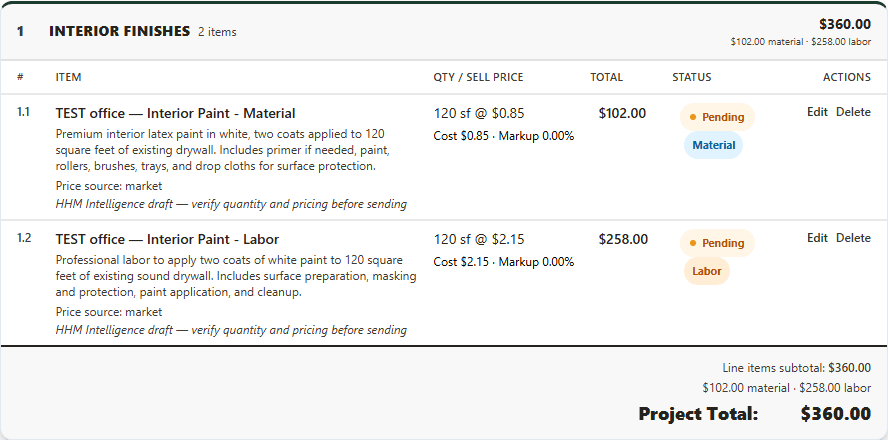
Draft the estimate. Open Instant quote in the project, enter a title, area and work description, and choose Create quote.
Check the draft. Check the estimate’s scope, quantities and prices, then edit it before sharing or sending.
Ask about the job. Open Ask HHM Intelligence in the project, type a question, and choose Ask.
Check the answer. Compare the answer with the job records you can access before you act.
Review with Council. On Pro or higher, open a quote with line items and run Council review before sending.
Review Risk Radar. On Pro or higher, choose Scan portfolio or Refresh now in Risk Radar, then review the job details.
On any plan, use credit to create a draft. Open Instant quote in the project. Enter a title, area and description of the work, then choose Create quote.
Review the draft’s scope, quantities and prices before sharing or sending it.
Open Ask HHM Intelligence in the project. Type a question and choose Ask. Read the answer alongside the job records before acting. Project questions use credit on every plan.
Each person’s answers use the project information they can access.
On Pro or higher, open a quote with line items and run HHM Intelligence Council Review. Read the recommendation and check the quote before approving or sending it.
On Pro or higher, open Risk Radar on the dashboard and choose Scan portfolio or Refresh now. Review budget, schedule, materials and staffing signals, then open the job details to choose the next action.
New features are free on paid plans during beta. See the beta terms for dates and charges.
Review answers and estimates before using them.
After beta: Available on every plan. Use starting credit or buy a credit pack.
Decision support; your team makes the final decision.
After beta: Included in Pro and All-Inclusive.
Cookies help us understand how this website is used.